
How to create Apple IDs for your children?
Creating separate Apple IDs for your children has many benefits. With Apple Family Sharing, you can give your child digital independence while still maintaining oversight and keeping them safe online.
Children under 13 cannot create an Apple ID on their own. A parent or guardian must create it for them.
Before You Begin
- Make sure you have an Apple ID for yourself.
- Set up Family Sharing on your device. Learn more
Enable Family Sharing
- Open Settings on your iOS device.
- Tap your name at the top.
- Select Set Up Family Sharing and follow the onscreen instructions.
-
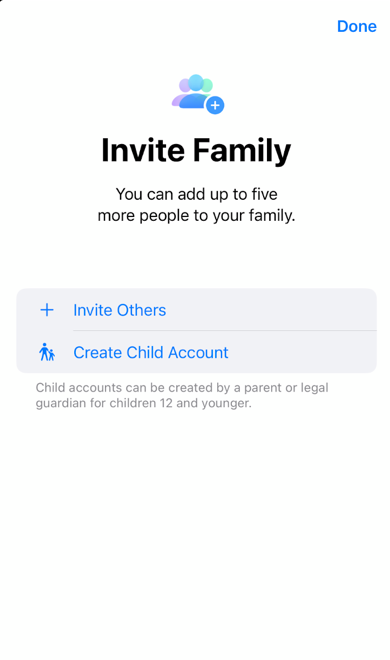
You will be asked to invite family members.
Add Your Child to Family Sharing
- In the Family Sharing settings, tap Add Family Member.
-
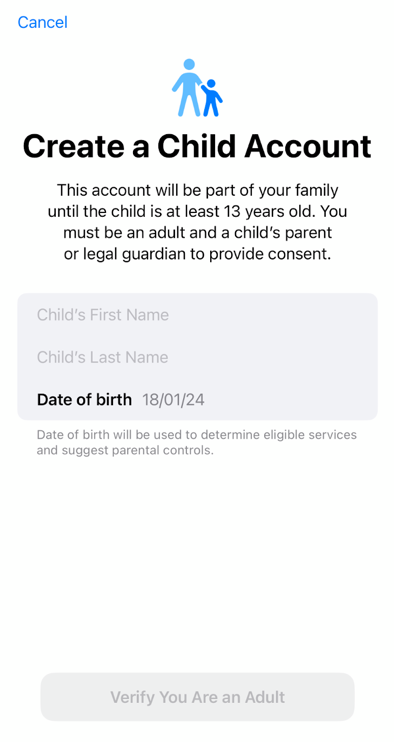
Choose Create a Child Account and follow the prompts.
Enter Your Child’s Information
- Enter your child’s name and birthday.
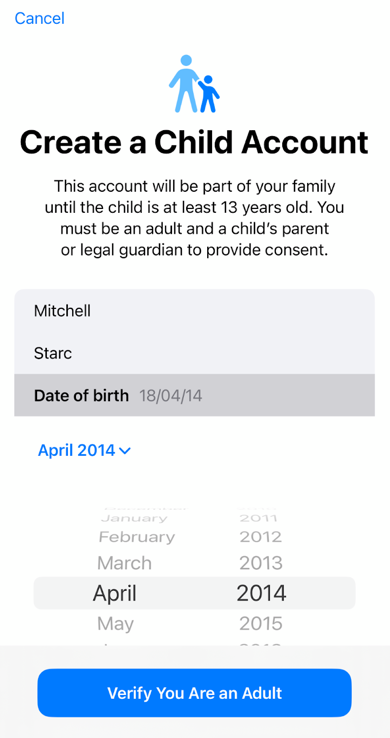
- Follow the instructions to complete account setup.
Set Up an Apple ID for Your Child
- Create a unique Apple ID for your child.
- If your child doesn’t have an email yet, you can create a new iCloud email during this process.
Agree to Parental Consent
- You’ll be asked to agree to parental consent terms before the Apple ID is created.
- Read through the terms carefully and confirm.
Once completed, your child will be added to Family Sharing with their own Apple ID.